Návod Sencor SEC 183 Kalkulačka

Potrebujete príručku pre svoj Sencor SEC 183 Kalkulačka? Nižšie si môžete bezplatne prezrieť a stiahnuť príručku vo formáte PDF v slovenskom jazyku. Tento produkt má momentálne 1 často kladenú otázku, 1 komentár a má 2 hlasov s priemerným hodnotením produktu 100/100. Ak toto nie je manuál, ktorý chcete, kontaktujte nás.

Je váš výrobok pokazený a nepodarilo sa vám problém odstrániť pomocou pokynov v návode? Prejdite na portál Repair Café, kde nájdete bezplatné servisné služby.

Návod

Loading…
5 - EN
Input Capacity
The memory area used for calculation input can hold 79 “steps,” One step Is taken up each
time you press a number key or arithmetic operator key (
M
). A SHIFT or
ALPHA key operation does not take up a step, so inputting SHIFT or √. for example, takes up
only one step.
You can input up lo 79 steps for a single calculation. Whenever you input the 73rd step of
any calculation, the cursor changes from “_” to “” to let you know memory is running low.
If you need to input more than 79 steps, you should divide you calculation into two or more
parts.
Pressing the Ans key recalls the last result obtained, which you can use in a subsequent
calculation. see “Answer Memory” for more information about using the Ans key.
Making Corrections During Input
Use and to move the cursor to the location you want.
Press DEL to delete the number or function at the current cursor position.
Press SHIFT INS to change to an insert cursor kkk. Inputting something while the insert
cursor is o the display insert the input at the insert cursor position,
Pressing SHIFT INS, or = return to the normal cursor from the insert cursor.
Replay Function
Every time you perform a calculation, the replay function stores the calculation formula and
its result in replay memory. Pressing the key displays the formula and result of the calcula-
tion you last performed. Pressing again back steps sequentially (new-to-old) through past
calculations.
Pressing the or key while a replay memory calculation is on the display changes to the
editing screen.
Pressing the or key immediately after you finish a calculation display the editing screen
for that calculation.
Pressing AC does not clear replay memory, so you can recall the last calculation even after
you press AC.
Replay memory capacity is 128 bytes for storage of both expressions and results.
Replay memory is cleared by any of the following actions.
When you press the ON key
When you initialize modes and settings by pressing SHIFT CLR 2 (or 3) =.
When you change from one calculation mode to another.
When you turn off the calculator.
Error Locator
Pressing or after an error occurs displays the calculation with the cursor positioned at
the location where the error occurred.
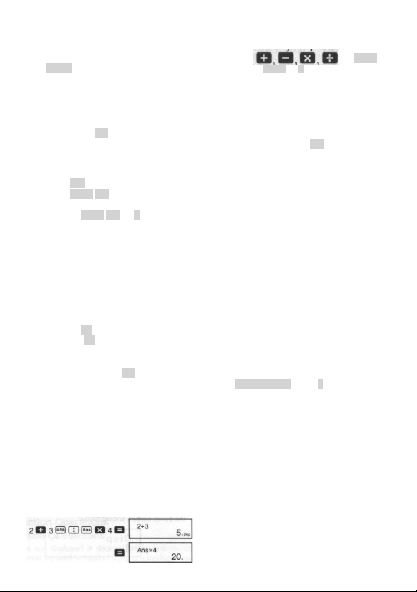
Multi-statements
A multi-statement is an expression that is made up of two or more smaller expressions, which are
joined using a colon ( :).
Example: To add 2 + 3 and then multiply the result by 4
\
© FAST ČR a. s.
Stiahnuť návod v slovenčine (PDF, 4.04 MB)
(Myslite ekologicky a návod si vytlačte, len ak je to naozaj potrebné)

Loading…

Hodnotenie

Dajte nám vedieť svoj názor na Sencor SEC 183 Kalkulačka a ohodnoťte výrobok. Chcete sa podeliť o svoje skúsenosti s týmto výrobkom alebo sa niečo spýtať? Napíšte komentár v spodnej časti stránky.
Ste spokojní s Sencor SEC 183 Kalkulačka?
Áno Žiadny
100%
0%
2 hlasy

Zapojte sa do diskusie o tomto výrobku

Tu sa môžete podeliť o to, čo si myslíte o Sencor SEC 183 Kalkulačka. Ak máte otázku, najprv si pozorne prečítajte návod. Vyžiadanie manuálu je možné vykonať pomocou nášho kontaktného formulára.

Gyebrovszky Attila 28-10-2025
Návod na použitie

odpovedať | Bolo to užitočné (0) (Preložené Googlom)

Viac o tomto návode

Chápeme, že je pekné mať k svojmu Sencor SEC 183 Kalkulačka papierovú príručku. Návod si môžete kedykoľvek stiahnuť z našej webovej stránky a vytlačiť si ho sami. Ak chcete mať originálnu príručku, odporúčame vám kontaktovať Sencor. Mohli by byť schopní poskytnúť originálny návod. Hľadáte príručku k svojmu Sencor SEC 183 Kalkulačka v inom jazyku? Vyberte si preferovaný jazyk na našej domovskej stránke a vyhľadajte číslo modelu, aby ste zistili, či ho máme k dispozícii.

Technické údaje

Značka Sencor
Model SEC 183
Kategória Kalkulačky
Typ súboru PDF
Veľkosť súboru 4.04 MB

Všetky príručky pre Sencor Kalkulačky
Ďalšie príručky od Kalkulačky

Často kladené otázky o Sencor SEC 183 Kalkulačka

Náš tím podpory vyhľadáva užitočné informácie o výrobkoch a odpovede na často kladené otázky. Ak nájdete v našich často kladených otázkach nejakú nezrovnalosť, dajte nám o tom vedieť pomocou nášho kontaktného formulára.

Batéria v mojom prístroji je oxidovaná. Môžem ju napriek tomu bezpečne používať? Overená

Ja, zariadenie sa dá stále bezpečne používať. Najskôr vyberte oxidizdovú batériu. Nikdy na to nepoužívajte holé ruky. Potom vyčistite priehradku na batérie vatovým tampónom namočeným v octe alebo citrónovej šťave. Nechajte zaschnúť a vložte nové batérie.

Bolo to užitočné (484) Čítaj viac
Návod Sencor SEC 183 Kalkulačka

Súvisiace produkty

Súvisiace kategórie

×
Download