
Návod Trust 16529 Grafický tablet

Potrebujete príručku pre svoj Trust 16529 Grafický tablet? Nižšie si môžete bezplatne prezrieť a stiahnuť príručku vo formáte PDF v slovenskom jazyku. Tento produkt má momentálne 0 často kladené otázky, 0 komentárov a má 0 hlasov. Ak toto nie je manuál, ktorý chcete, kontaktujte nás.

Je váš výrobok pokazený a nepodarilo sa vám problém odstrániť pomocou pokynov v návode? Prejdite na portál Repair Café, kde nájdete bezplatné servisné služby.

Návod

Loading…
Slimline Widescreen Tablet – User’s Manual
3
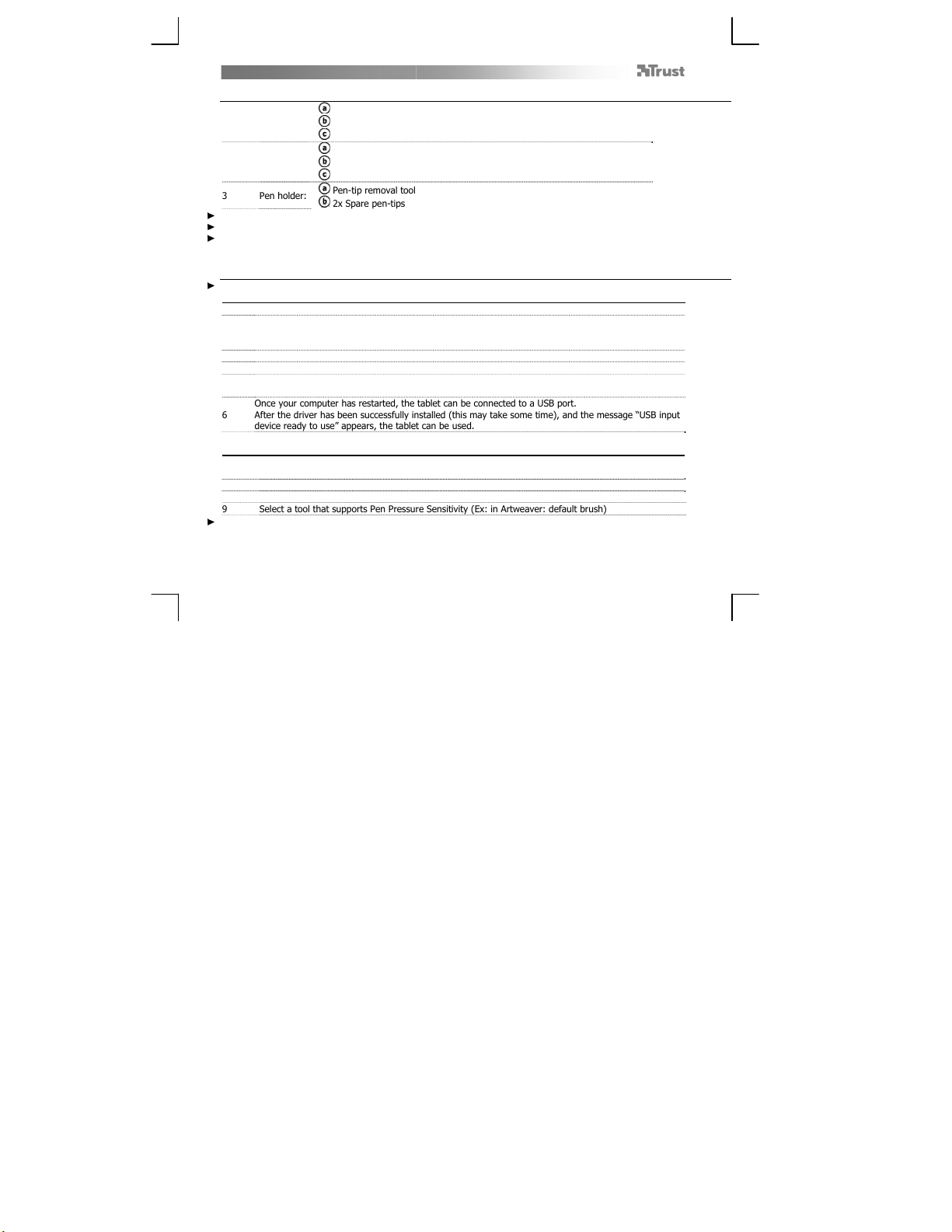
Package contents (Package contents)
1
T
ablet:
USB Cable
Working area
Hot cells (programmable)
2 Pen:
Lower pen button
Upper pen button
Battery holder
3 Pen holder:
Pen-tip removal tool
2x Spare pen-tips
Screw the pen open and place the battery in the pen
Cleaning: Clean the tablet with a dry cloth. Do not use or spill water on the tablet, or its pen.
Storage: Store the pen so that it does not rest on its tip, preferably in its holder. Do not store the pen on the tablet.
Install tablet (Install tablet)
It might be necessary to restart your computer at the end of the driver’s installation. It is therefore preferable that you
save and close all opened documents and applications before starting the installation.
4 Insert the Trust CD-ROM into your CD drive.
5
Windows 8: click the “Tab to choose” message window in the right top corner of the screen
Click “Run Setup.exe – Published by Trust International BV”
Click “Install driver”
Trust Tablet driver installation: To continue, Click “OK”
Trust Tablet driver was successfully installed: Click “OK”
ou must restart your computer: Click “OK” to restart your computer. (If you have unsaved
documents and files, select “Cancel” to restart your computer later)
6
Once your computer has restarted, the tablet can be connected to a USB port.
After the driver has been successfully installed (this may take some time), and the messageUSB input
device ready to use appears, the tablet can be used.
Draw (Draw)
Open a drawing program (For example, Artweaver is available on the Trust CD-ROM: select “Install
ArtWeaver” from the menu to install it.)
7 Create a new document (File > New)
8 Set the attributes of your new document, press OK
9 Select a tool that supports Pen Pressure Sensitivity (Ex: in Artweaver: default brush)
With the pen’s pressure levels, you can use your brush the way you would use a real pencil and draw the thickness and
opacity you desire.
Stiahnuť návod v slovenčine (PDF, 2.88 MB)
(Myslite ekologicky a návod si vytlačte, len ak je to naozaj potrebné)

Loading…

Hodnotenie

Dajte nám vedieť svoj názor na Trust 16529 Grafický tablet a ohodnoťte výrobok. Chcete sa podeliť o svoje skúsenosti s týmto výrobkom alebo sa niečo spýtať? Napíšte komentár v spodnej časti stránky.
Ste spokojní s Trust 16529 Grafický tablet?
Áno Žiadny
Ohodnoťte výrobok ako prvý
0 hlasy

Zapojte sa do diskusie o tomto výrobku

Tu sa môžete podeliť o to, čo si myslíte o Trust 16529 Grafický tablet. Ak máte otázku, najprv si pozorne prečítajte návod. Vyžiadanie manuálu je možné vykonať pomocou nášho kontaktného formulára.

Viac o tomto návode

Chápeme, že je pekné mať k svojmu Trust 16529 Grafický tablet papierovú príručku. Návod si môžete kedykoľvek stiahnuť z našej webovej stránky a vytlačiť si ho sami. Ak chcete mať originálnu príručku, odporúčame vám kontaktovať Trust. Mohli by byť schopní poskytnúť originálny návod. Hľadáte príručku k svojmu Trust 16529 Grafický tablet v inom jazyku? Vyberte si preferovaný jazyk na našej domovskej stránke a vyhľadajte číslo modelu, aby ste zistili, či ho máme k dispozícii.

Technické údaje

Značka Trust
Model 16529
Kategória Grafické tablety
Typ súboru PDF
Veľkosť súboru 2.88 MB

Všetky príručky pre Trust Grafické tablety
Ďalšie príručky od Grafické tablety
Návod Trust 16529 Grafický tablet
×
Download