Návod Hama 00221050 Nano Diaľkový ovládač

Potrebujete príručku pre svoj Hama 00221050 Nano Diaľkový ovládač? Nižšie si môžete bezplatne prezrieť a stiahnuť príručku vo formáte PDF v slovenskom jazyku. Tento produkt má momentálne 6 často kladené otázky, 0 komentárov a má 0 hlasov. Ak toto nie je manuál, ktorý chcete, kontaktujte nás.

Je váš výrobok pokazený a nepodarilo sa vám problém odstrániť pomocou pokynov v návode? Prejdite na portál Repair Café, kde nájdete bezplatné servisné služby.

Návod

Loading…
5
7.1 Before you start the learning function
Make surethat allbatteriesused in both remote controls areinperfect condition.
Change them if necessary.
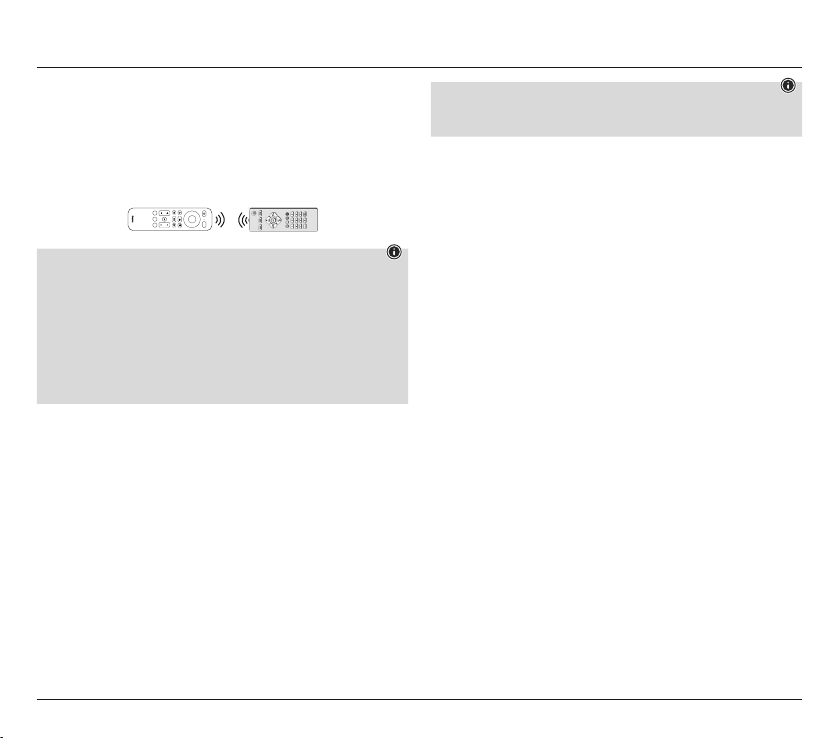
Place your original remote control and the universalremote control nexttoeach other
so that the infrared diodes of the remote controls aredirectly opposite each other.
If necessary,correct the height of both remote controls to achieveoptimalalignment.
The distance between the two remote controls should be approx.3cm.
ca.3cm
ORIGINAL
Nano
setup
vol
Disney
Netflix
primevi-
deo
ch
Note
Do not move the remote controls during the learning process.
Make surethat the room lighting is not uorescenttubes or energy-saving lamps,
as these could cause interference and thus hinder the learning process.
The distance betweenthe two remote controls andthe nearest lightsource should
be at least 1metre.
In learning mode, each button can only be assigned onefunction. Anew function
overwrites the function previously taught on this button.
Press the Setup button (12) to end the learning function.
Except for the Setup button (12), allbutton can be assigned ataught-in function.
7.2 Activating the learning function /transferringthe button function
1. Press and hold the Setup button (12)for approx. 3seconds until the LED lights up to
start Setup mode.
2. To teach acommand in TV mode, enterthe code 98000or98001for STB
mode.
3.
Press the key of the Streaming Remote to which youwant to teach anew function.
TheLED ashes 2x and then lights up permanently.Ifnobutton is pressed within 15
seconds, the LED ashes 6times and the learning function is terminated.
4.
Now press the button on the original remote control whose function you want to
transfer.
If the LED goes out brieyand then lights up again permanently,the function has
been successfully taught. If the LED ashes6times quickly,the transfer hasfailed.
Check the position of the two remote controls and make surethe batteries arefull.If
no command is received within 35 seconds, the LED ashes 6times and the learning
function is terminated.
5.
To teach morebuttons, repeat steps 3and 4.
6. After you have transferred allthe desired functions, press the Setup button (12) to
save allthe taught-in functions and exit Learning mode.
Note
When changing the batteries of the universal remotecontrol, the functions of the
taught-in buttons areretained.
7.3Deleting taught functions
7.3.1 Deleting ataught function
1. Press and hold the Setup button (12) for approx. 3seconds until the LED lightsup
permanently to start Setup mode.
2. Enter the code 98100 for TV mode or 98101 forSTB mode. TheLED ashes once.
3. Press the button of the Streaming Remote whosetaught-in function is to be deleted.
4. The LED ashes once, the taught-in function is deleted and has been replaced by the
function of the factory setting.
5. To delete morebuttons, repeat step 3.
6. To exit the menu, press the Setup button (12).
7.3.2 Deletingall taught functions
1. Press and hold the Setup button (12) for approx. 3seconds until the LED lightsup
permanently to start Setup mode.
2. Enter the code 98200 to deleteall taught-in buttons in TV mode or 98201 to delete
alltaught-in buttons in STBmode.
3. The LED ashes 2x,all taught-in functions aredeleted and arereplaced by the
functions of the factory setting.
8. Restoring factory settings
1. Press and hold the Setup button (12) for approx. 3seconds until the LED lightsup
permanently to start Setup mode.
2. Enter the number 99999.
3. Allsettings and taught-in functions aredeleted and arereplaced by the functions of
the factory setting.
9. Switchingillumination on/off
Press the Power and Mute buttons simultaneously (1)+(7).
Ifthe LED ashes green once, the illumination of the remotecontrol is switched on.
If the LED ashes redonce, the illumination is switched off.
When the illumination is switched on, it goes out eachtime the button is pressed and
lights up again for approx. 3seconds as soon as the button is released.
10. Maintenance
Never use old and new batteries in the universal remotecontrol at the same time, as
old batteries tend to leak and can lead to alossofperformance.
Never clean the universal remote controlwith scouring agents or harsh cleaning
agents.
Keep the universal remote controlfreeofdustbycleaning it withadry soft cloth.
Stiahnuť návod v slovenčine (PDF, 1.56 MB)
(Myslite ekologicky a návod si vytlačte, len ak je to naozaj potrebné)

Loading…

Hodnotenie

Dajte nám vedieť svoj názor na Hama 00221050 Nano Diaľkový ovládač a ohodnoťte výrobok. Chcete sa podeliť o svoje skúsenosti s týmto výrobkom alebo sa niečo spýtať? Napíšte komentár v spodnej časti stránky.
Ste spokojní s Hama 00221050 Nano Diaľkový ovládač?
Áno Žiadny
Ohodnoťte výrobok ako prvý
0 hlasy

Zapojte sa do diskusie o tomto výrobku

Tu sa môžete podeliť o to, čo si myslíte o Hama 00221050 Nano Diaľkový ovládač. Ak máte otázku, najprv si pozorne prečítajte návod. Vyžiadanie manuálu je možné vykonať pomocou nášho kontaktného formulára.

Viac o tomto návode

Chápeme, že je pekné mať k svojmu Hama 00221050 Nano Diaľkový ovládač papierovú príručku. Návod si môžete kedykoľvek stiahnuť z našej webovej stránky a vytlačiť si ho sami. Ak chcete mať originálnu príručku, odporúčame vám kontaktovať Hama. Mohli by byť schopní poskytnúť originálny návod. Hľadáte príručku k svojmu Hama 00221050 Nano Diaľkový ovládač v inom jazyku? Vyberte si preferovaný jazyk na našej domovskej stránke a vyhľadajte číslo modelu, aby ste zistili, či ho máme k dispozícii.

Technické údaje

Značka Hama
Model 00221050 Nano
Kategória Diaľkové ovládače
Typ súboru PDF
Veľkosť súboru 1.56 MB

Všetky príručky pre Hama Diaľkové ovládače
Ďalšie príručky od Diaľkové ovládače

Často kladené otázky o Hama 00221050 Nano Diaľkový ovládač

Náš tím podpory vyhľadáva užitočné informácie o výrobkoch a odpovede na často kladené otázky. Ak nájdete v našich často kladených otázkach nejakú nezrovnalosť, dajte nám o tom vedieť pomocou nášho kontaktného formulára.

Ako pripojím univerzálne diaľkové ovládanie k televízoru? Overená

Na pripojenie univerzálneho diaľkového ovládača potrebujete číslo modelu a obchodnú značku diaľkového ovládača aj televízora. V príručke k diaľkovému ovládaniu je zoznam kódov značiek a čísel modelov.

Bolo to užitočné (8002) Čítaj viac

Prečo sú vedľa čísel na diaľkovom ovládaní písmená? Overená

Niektoré nastavenia televízora môžu vyžadovať zadávanie písmen. Na tlačidle sú zvyčajne tri písmená alebo iné znaky. Ak je potrebné zadať písmeno, môžete toto tlačidlo stlačiť raz pre prvé písmeno, dvakrát stlačiť pre druhé písmeno a trikrát pre tretie písmeno. Týmto spôsobom je možné text písať s minimálnym počtom tlačidiel.

Bolo to užitočné (683) Čítaj viac

Bude moje diaľkové ovládanie fungovať aj na iných televíznych modeloch rovnakej značky? Overená

Diaľkové ovládanie televízora často funguje aj na podobných modeloch tej istej značky. Je však neobvyklé, že bude fungovať na všetkých modeloch tejto značky. Na to sú vhodnejšie univerzálne diaľkové ovládače.

Bolo to užitočné (524) Čítaj viac

Aký je priemerný dosah infračerveného diaľkového ovládača? Overená

Priemerný infračervený diaľkový ovládač mal dosah okolo 3 až 6 metrov. Čím ďalej je zariadenie vzdialené, tým ťažšie bude smerovať.

Bolo to užitočné (412) Čítaj viac

Batéria v mojom prístroji je oxidovaná. Môžem ju napriek tomu bezpečne používať? Overená

Ja, zariadenie sa dá stále bezpečne používať. Najskôr vyberte oxidizdovú batériu. Nikdy na to nepoužívajte holé ruky. Potom vyčistite priehradku na batérie vatovým tampónom namočeným v octe alebo citrónovej šťave. Nechajte zaschnúť a vložte nové batérie.

Bolo to užitočné (372) Čítaj viac

Môžem vymeniteľnú batériu nechať v zariadení dlhší čas? Overená

Vymeniteľné batérie môžu v prístroji zostať dlho, ak sa používa. Pri dlhodobom skladovaní zariadenia sa odporúča vybrať batérie, aby sa zabránilo oxidácii.

Bolo to užitočné (271) Čítaj viac
Návod Hama 00221050 Nano Diaľkový ovládač

Súvisiace produkty

Súvisiace kategórie

×
Download